
Nowadays kids grow up with tablets and smartphone more than with classic PC’s. From the first grade on all kids in our city get an Apple iPad for using it in school for free. Thats great in terms that all kids have the same material to work with, doesnt matter if they have rich parents or not. On the other hand it always hurts to see if kids try to use a monitor as a touchscreen when i am attending the open house at the school of my oldest daughter, helping out there at the computer science faculty. Most of the kids have no regular computer at home and can barely use a keyboard, many of them never toucht a computer mouse. That causes pain for somebody with an engineering degree in computer science.
Lets face it: the family PC of the 90s and early 2000s simply vanished in a matter of years.
But that also means a new project for me, because i do not want my kids to grow up beeing only able to to use a tablet. So its time for their first Linux PC’s.
What are the minimum requirements?
- Affordable – i need all the stuff three times, so every penny saved is good
- Sustainbale – we only have one planet so buying new shortliving cheap stuff isn’t the correct choice
- Compact – there is already enough stuff flying across my kids desks
- Ergonomic – no need to get a crooked back using a PC
Of course the first reaction was: LAPTOPS! Yeah until i thought a bit more about it
It begins with the first two points, the solution should be affordable and sustainable. So it should be used enterprise grade laptops where you can also get spares etc. These old Thinkpads and Latitudes are always the first hint you get when it comes to Linux hardware. What should i say the most stuff you get for less than 200€ is junk. Either it is older than ten years, or you have broken cases, scratched displays etc. And i need three nearly equal machines.
Yes they are compact but to be ergonomic you need to add an external monitor, keyboard and mouse anyway. I mean you can remember when they send us home because of Covid 19 with only our Laptops working on the kitchen table, wasnt very ergonomic, am i wright?
Also because of the iPads my kids would never take that machines to school. The nearly broken battery in all this machines which will not get better using the Latops as desktop replacement is another topic.
So Laptops are a no-go, so what else could we use? Many people use small mini PC’s like the Lenovo Thinkcentre in their homelabs. They are quite cheap, sustainable and compact. I’ve ordered three Thincentre M715q with 8GB Ram for 80€ each. I had NVMe SSD’s at home just like three 24″ Displays. Keyboard, Mouse etc. can be bought for a bargain at shops like Action.
But how do i build a compact system out of that. In this case the IKEA Skadis Pegboards and my 3D printer comes to the rescue. I bought the big 76cmx56cm Skadis boards and mounted everything on it using 3D Printed parts and cableties.
And thats how each station looks now:
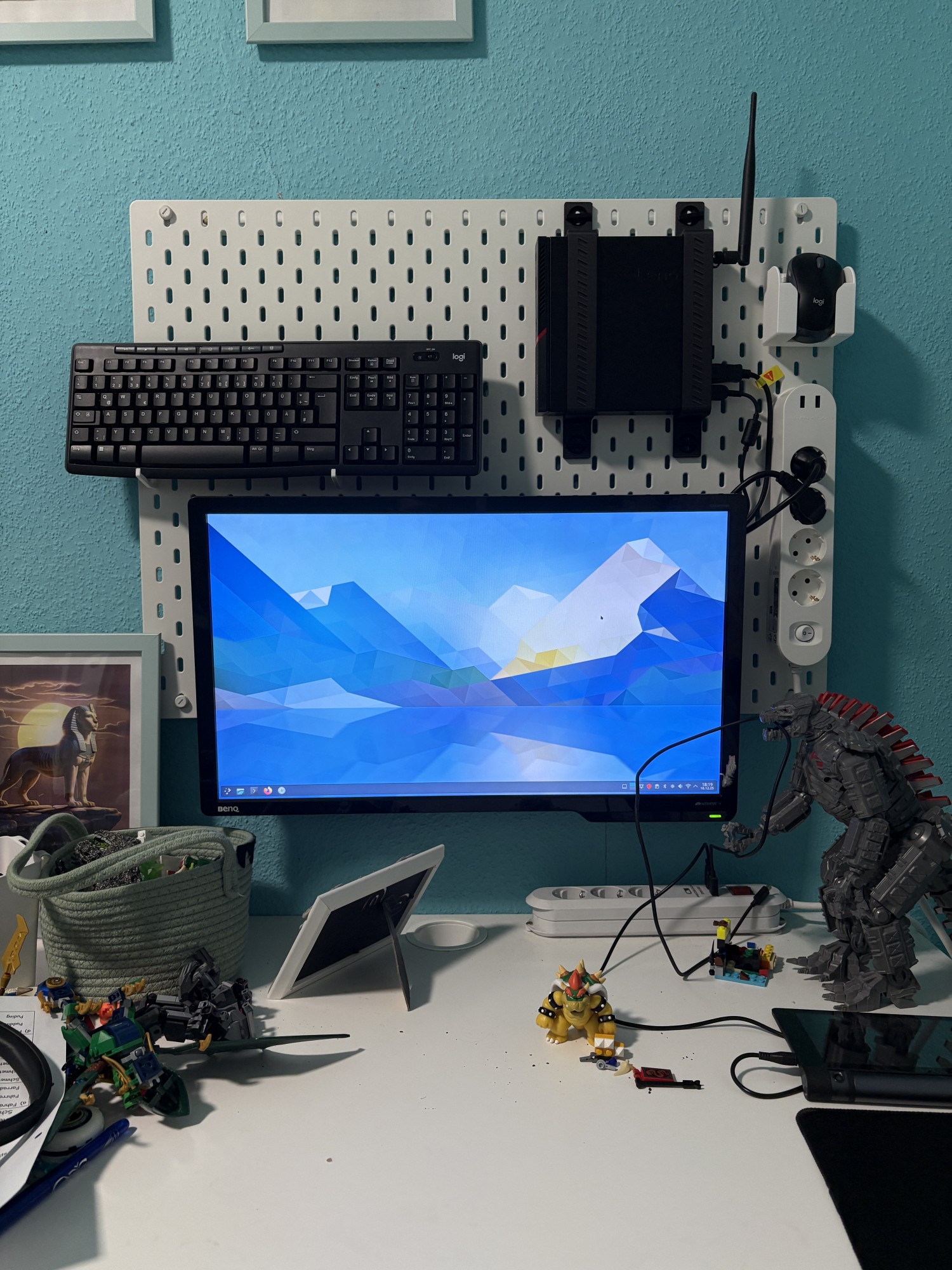
I think this is a quite clean solution. Each pc runs Manjaro Linux and KDE. And you could also adjust the height of the Display when the kids grow.
Here is a selection of 3D Printed parts is used:
https://www.printables.com/model/339820-ikea-skadis-vesa-mount-100×100
https://www.printables.com/model/256896-skadis-t-clip-system
https://www.printables.com/model/530560-skadis-mouse-cup
https://www.thingiverse.com/thing:2853261/ (One word to the Skadis Universal hook: scale it 0.2mm thinner or you have a hard time)
https://www.printables.com/model/656685-skadis-keyboard-holder-25mm-30mm
I am very glad that there are so many talented designers out there making stuff for the Skadis system. Now it is time to practice the correct usage of the systems with the kids. Maybe i will to same basic presentations for the kids regarding computers, networks, the Internet, privacy etc. If i do i will post about that here also.
Thats it for now if you have any questions, additions etc. let me know.












Kommentare
@blog Thank you for this post! I feel the same pain like you and try to take the same route with my kid. For now we have a thinkpad t470 with debian installed, playing around with gcompris. But in the near future I will build a desktop to use.
@blog Very clean solution, good job! Please keep.us updated about your progress.
Die Kommentare sind geschlossen.